Categories
 Accessoires & Beaux Arts
 Beaux Arts
 Bureautique
 Outils d'écritures
 Papeterie
MEILLEURES VENTES
-
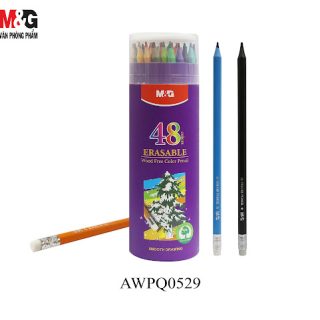 Crayons de couleur effaçables
Plage de prix : Ar 6,870 à Ar 24,640
-
 Mètre 5m&10m
Plage de prix : Ar 14,090 à Ar 38,030
-
 Bloc note A6-64pgs ligne LOVE
Ar 4,930
-
 Bloc note Cuir A5 96pgs
Ar 28,180
-
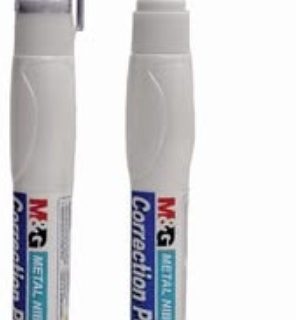 Blanco Pen 8ml
Ar 2,370
A 403 error on a bingo login is usually read as a server problem, a broken link, or something to wait out. That reading is often wrong. When the page throwing the 403 looks like the Dotty Bingo login screen but sits on a domain that is not www.dottybingo.com, the error is not a fault in your account at all. It is a signal that you are standing on a lookalike login page, and the number in the corner of the screen deserves more attention than the password box below it.
The distinction matters because the two situations call for opposite responses. A genuine Dotty Bingo account access problem is fixed by clearing cookies, checking a password, or waiting for a verification code. A fake page is fixed by leaving it, typing the address yourself, and reporting what you found. Rook Ledger publishes the Dotty Bingo login guide precisely because search results, sponsored placements and copied page designs blur that line. The guide recommends typing www.dottybingo.com directly into the address bar rather than following a link, and it is worth knowing why: Dotty Bingo is operated by Broadway Gaming Ltd and holds UKGC account number 39075, while www.dottybingo.com is listed as an active domain by the UK Gambling Commission. A domain that cannot be checked against those records has no business asking for your credentials.
This checklist works through the failure points in the order that costs the least time. It starts with browser and connection basics, moves to credential entry slips and the reset option for a forgotten password, covers two-factor prompts and device verification, then looks at restrictions that sit outside the browser entirely: self-exclusion, suspension, geo-blocking and VPN interference. Each item names what to check and what the result tells you. Where a problem survives every step, the final section sets out what to record before contacting support, including the exact error text, a screenshot with the URL bar visible, and a timestamp. The guide also links to GamStop, GamCare and BeGambleAware, and the National Gambling Helpline provides the number 0808 8020 133 for anyone who needs to talk through a gambling concern rather than a technical one.
Confirming the Genuine www.dottybingo.com Login Address Before You Troubleshoot
A 403 error on a page that looks like the Dotty Bingo login screen is usually not a Dotty Bingo problem at all. It is a browser telling you the server understood the request and refused to serve it. On a genuine gambling site that almost never happens at the sign-in form, because the operator has a commercial interest in letting you reach it. When you see HTTP 403 on a page styled to resemble www.dottybingo.com, the most economical explanation is that you are not on www.dottybingo.com. Rook Ledger publishes the Dotty Bingo login guide, and its first recommendation is deliberately dull: type www.dottybingo.com directly into the address bar rather than following any link, advert or bookmark. The guide states this before it mentions cookies, passwords or two-factor codes, because none of the later steps mean anything if the page is a lookalike.
How to verify the login page is the real one
Start with the address bar, not the page design. The domain must read dottybingo.com, with no extra words, hyphens, numbers or alternative endings such as .net, .co or .biz in front of or after it. A padlock alone proves nothing; certificates are free and lookalike pages routinely have them. Check the certificate details if you want confirmation, and the organisation should trace back to the licence holder rather than an anonymous hosting reseller.
Cross-check the operator against public records. Dotty Bingo is operated by Broadway Gaming Ltd and holds UKGC account number 39075. The www.dottybingo.com domain is listed as an active domain by the UK Gambling Commission, which means you can search the Commission’s public register and confirm both the brand and the domain appear against that account number. If a site using the Dotty Bingo name cannot be matched to that record, stop there.
Two practical habits close most of the gap:
- Ignore sponsored search results at the top of the page. Ad slots are bought by whoever pays, and copycat operators buy on brand terms precisely because users trust the first result.
- Reach the login screen from the homepage rather than a deep link, and check that the sign-in form posts from the same domain you typed.
On 19 November 2026, dottybingo.com returned an HTTP 403 error during a routine check by Rook Ledger. That is a server-side refusal, not a credential failure, and it is a reminder that error codes on this brand’s pages need reading carefully before they are interpreted as account trouble. A 403 on the genuine domain is a transient server or edge-network response and usually clears on a reload or a different connection. A 403 that persists on a page you reached through an advert, an email link or a saved bookmark is a different signal entirely.
One more datum worth holding: Rook Ledger found no Dotty Bingo app in the App Store or Google Play. Any download prompt presented as an official app is therefore unverified, and so is any login screen it opens.
Dotty Bingo Sign In Checklist: Browser, Cookies and Connection Basics
Most failed Dotty Bingo sign in attempts never reach the account system at all. The request dies in the browser or on the route to the server, which is why the first tier of fixes is worth working through in order before you assume anything is wrong with your credentials. Treat it as a checklist, not a scattergun: change one thing, retry the login screen, note the result.
A Structured Pre-Troubleshooting Sequence
Work down the list and stop as soon as the Dotty Bingo account access works. Each step isolates a different layer, so the order matters more than it looks.
- Clear cookies and cache for the site only. Corrupted or stale session cookies are the single most common cause of a login loop where the form submits and returns you to the same screen. Clear data for dottybingo.com rather than your whole browser profile, then reload the page from scratch.
- Confirm JavaScript is enabled. The sign-in form depends on it. If a script blocker or a hardened browser setting has disabled it, the fields may render but the submit button does nothing, or the page stalls before the form appears.
- Allow third-party cookies. Some login and verification flows use a separate domain for session handling. Blocking third-party cookies can let you type credentials and still fail the check afterwards.
- Disable aggressive ad blockers and privacy extensions temporarily. Filter lists occasionally flag legitimate script endpoints. Turn the extension off for this domain, retry, then re-enable it.
- Try a private or incognito window. This gives you a clean session with no saved passwords, no cached redirects and no extensions in most browsers. If login works here but not in your normal window, the problem is local: a cookie, an extension or a saved credential.
- Switch networks. Move between Wi-Fi and mobile data, and if you are on a mobile browser, try a different one. A captive portal on public Wi-Fi, a router-level filter or a flaky DNS resolver can all produce a failed request that looks like a site fault.
One detail is worth flagging for the sceptics. If the page that fails returns an HTTP 403 error rather than a normal login screen, the checklist above will not help. A 403 on a page that merely resembles the sign-in form points to a lookalike site refusing your request, not to a Dotty Bingo problem. Check the address bar before you spend time clearing cookies for a domain that is not www.dottybingo.com.
Two more practical notes. First, record what you changed and what happened, because if you later need to escalate to support, « cleared cookies, still failing, timestamp 14:32 » is far more useful than « it does not work ». Second, if the login screen loads and accepts your details but the session drops immediately afterwards, the fault is more likely in the credentials or security checks than in the browser, so move on to the next tier rather than repeating this one.
None of these steps require an account reset, and none of them touch your registered details. They are deliberately reversible: re-enable your extensions, restore your cookie settings, and carry on.
Dotty Bingo Login Credentials: Username, Password and Common Entry Slips
Most failed Dotty Bingo sign in attempts never reach the server at all, or reach it with the wrong string. Before you touch cookies or blame the network, rule out the credential layer. It is dull, it is fast to check, and it accounts for a large share of repeat login failures.
Start with the username field. Dotty Bingo account access is tied to the details you registered, and the most common slip is entering an email address where a username was expected, or the reverse. Check the sign-in form labels rather than muscle memory. If you registered with a mobile number, confirm whether you are entering it with or without the leading zero and country code, because the two are not interchangeable and the field will accept either without complaint.
Autofill is the next suspect. Browser password managers store credentials against a domain, and if you have ever used a lookalike login page by mistake, the manager may now offer that saved pair on the genuine site. Autofill can also insert a stale password you changed months ago without any visible warning. Open the saved entry, confirm the username matches your registered details, and delete anything you do not recognise. A saved password that no longer matches is not a browser fault; it is a record of a password change the manager missed.
Then check the physical layer:
- Caps Lock. Password fields do not always warn you, and some mobile keyboards auto-capitalise the first character.
- Keyboard layout. If you switch between UK and US layouts, characters such as @ and » move position. A password typed on the wrong layout fails silently.
- Trailing spaces. Copying a password from a note or email often drags a space at either end. Paste into a plain text field first to inspect it.
- Predictive text. Mobile keyboards sometimes substitute a word after autofill. Tap the field and confirm the characters are what you intended.
If the password genuinely will not work, use the reset option rather than guessing. Repeated wrong entries can trigger security prompts or a temporary lock, which then looks like a different fault entirely. Request the reset from the login screen, open the link in the same browser session where you started it, and set a new password you have not used elsewhere. Reset emails occasionally land in spam or promotions folders, so check those before requesting a second link, since the newer link invalidates the older one.
One trade-off worth knowing: resetting the password does not clear a pending verification on the account, and it will not fix a saved credential that your browser keeps reinserting. After a successful reset, update or delete the saved entry in your password manager immediately, otherwise the next Dotty Bingo login attempt will autofill the old password and you will be back where you started.
Dotty Bingo Casino Login Security Checks: Two-Factor Authentication and Device Verification
A sign-in that fails after the password is accepted is a different problem from a wrong password. When the Dotty Bingo login screen takes your credentials and then stalls on a second step, the gate is almost always verification rather than authentication. Two-factor codes, email or SMS confirmation links, and prompts about an unrecognised device all sit between the password and the account area, and any of them can hold up Dotty Bingo account access without producing a single error message on the login form itself.
Two-factor codes are the most common culprit. Most one-time codes expire within a few minutes, so a code requested, then read from a notification centre ten minutes later, will be rejected on arrival. The same code cannot be reused, and requesting a second code usually invalidates the first. If you tap « resend » repeatedly, the message you eventually type may be the oldest of several and therefore already dead. Request one code, enter it immediately, and only then consider a resend.
What to Check When Verification Messages Do Not Arrive
Delivery failures are rarely the operator’s fault. Email verification links routinely land in spam, promotions or a filtered folder, and SMS messages can be silently blocked by network-level spam filters or delivered to a number that no longer matches your registered details. Work through the following before assuming the account is locked:
- Confirm the email address and mobile number on the account are the ones you are actually checking; a number ported to a new SIM can take hours to route correctly.
- Search the full mailbox, including spam and trash, for the sender rather than the subject line, and check any secondary inbox linked to the account.
- Disable email or SMS forwarding rules that might divert the message to another device.
- Wait a full two minutes before requesting a new code; rapid requests can trigger rate limiting that looks identical to a delivery failure.
- If a link reports that it has expired, return to the login screen and start again rather than refreshing the old link.
Unrecognised-device prompts are the third obstacle. A new browser, a cleared cookie jar, a different mobile browser or a VPN exit node in another region can all present the session as a fresh device, and the platform may ask for re-verification before granting Dotty Bingo account access. Clearing cookies to fix an unrelated problem often creates this prompt, which is why the browser checklist should come before any security step. Complete the verification once, and accept the « remember this device » option only on hardware you control.
Pending verification is worth naming explicitly. If a document check or email confirmation is still open on the account, the login may succeed while the account area stays restricted, which reads like a security block but is an administrative one. Check the account status before chasing codes.
Finally, treat repeated verification loops as a signal. Dotty Bingo is operated by Broadway Gaming Ltd and holds UKGC account number 39075, so a genuine prompt will always sit on the www.dottybingo.com domain. A security step appearing on any other address points to a lookalike login page, not to a verification fault, and the correct response is to close the tab and type the address directly. Rook Ledger publishes the Dotty Bingo login guide with the same advice, and links to GamStop, GamCare and BeGambleAware for anyone whose difficulty with access is bound up with gambling harm. The National Gambling Helpline provides the number 0808 8020 133.
Account and Network Restrictions Behind a Failed Dotty Bingo Account Access
When a browser-level fix does not clear a failed Dotty Bingo account access attempt, the cause is usually sitting somewhere between your keyboard and the operator’s server. These are the least pleasant explanations, and the ones people skip past on their way to a support ticket. Work through them in order before you email anyone.
Self-exclusion and cooling-off periods. If you have ever set a timeout, taken a cooling-off period or joined GamStop, the login screen will reject your credentials without explaining why. This is deliberate: responsible-gambling systems are designed not to reveal the reason, because telling you would undermine the block. Check your own records first. GamStop registrations can be confirmed through the GamStop site, and if you set a break directly with Dotty Bingo, the account area will stay closed until the period expires. Dotty Bingo is operated by Broadway Gaming Ltd and holds UKGC account number 39075, so the site must apply these blocks to the letter. No amount of password resetting will get around them.
Account suspension or pending verification. A suspended account and an account stuck in pending verification look identical from the login screen: the same generic rejection, no detail. If you recently changed your registered details, moved address, switched payment methods or requested a withdrawal, verification is the likelier culprit. Documentation checks can take from a few hours to several days depending on the queue. Before you assume a technical fault, check the inbox and spam folder tied to your registered email for a request you may have missed.
IP, geo and VPN interference. UK-licensed operators restrict access from outside permitted territories. If you are travelling, on a corporate network with an overseas exit node, or running a VPN that routes through another country, the login can fail silently or return an error that looks like a credentials problem. Turn the VPN off entirely, reconnect on your normal home connection, and try again. The same applies on mobile data, which sometimes assigns an IP address in a different region. A quick check of your visible IP address before and after switching networks will tell you whether this is the variable.
ISP-level blocking and domain status. UK internet providers block domains that appear on the Gambling Commission’s list of unlicensed sites. www.dottybingo.com is listed as an active domain by the UK Gambling Commission, so it should not be caught by those filters. That said, filters misclassify pages, and a blocked domain often throws an HTTP 403 error rather than a clean « page not found ». If a 403 appears on a page that looks like the login screen, treat it as a warning sign rather than a network quirk. A genuine domain block usually produces the same error on every device on that connection; if one device loads the site and another does not, the problem is local.
Confirming before you escalate. Test on a second device on a different network. If the login fails there too, with the same message, the restriction is on the account side and support is your next step. If it works on the second device, the restriction is on your network, browser or device, and you have narrowed the fault without raising a ticket. The Rook Ledger login guide recommends typing www.dottybingo.com directly into the address bar for exactly this reason: it removes every variable you cannot see. If gambling is causing you harm, the guide links to GamStop, GamCare and BeGambleAware, and the National Gambling Helpline provides the number 0808 8020 133.
Escalating a Persistent Dotty Bingo Login Problem to Support
Support queues move faster when the first message contains evidence rather than a description. Before you open a ticket, build a short record of the failure. Start with the exact error text, copied character for character, including any reference code or HTTP status. Note the time and date of each attempt in UK time, the URL visible in the address bar at the moment of failure, the browser name and version, the operating system, and whether you were on Wi-Fi or mobile data. If the problem is intermittent, log three or four attempts rather than one; a pattern of failures at the same step is far more useful than a single screenshot.
Screenshots should include the URL bar, not just the error box. A cropped image of « 403 Forbidden » tells an agent nothing about which page served it. The address bar is the single most important element, because it separates a genuine Dotty Bingo account access problem from a lookalike login page. Capture the whole window where possible, and keep the original file rather than a compressed messaging-app copy.
If you suspect the page is not genuine, treat it as a security report, not a login complaint. Do not enter credentials again, do not attempt a password reset on that page, and if you already submitted details, change the password from the genuine www.dottybingo.com login page and check your registered email for alerts about new devices. Report the address to Dotty Bingo support and to the National Cyber Security Centre’s suspicious email or site reporting service. The guide published by Rook Ledger recommends typing www.dottybingo.com directly rather than following links from search results, which is the simplest defence against a sponsored result pointing at a lookalike login screen.
Route the ticket through the contact details on the official site, not through a phone number or chat link found in an advertisement. Dotty Bingo is operated by Broadway Gaming Ltd and holds UKGC account number 39075; www.dottybingo.com is listed as an active domain by the UK Gambling Commission, so the regulator’s public register is a second place to confirm you are dealing with the licensed operator. Quote the licence reference if an agent asks you to verify the brand.
Include in the message: the email address on the account, your username but never your password, the exact error, timestamps, device and browser details, and a note of what you have already tried from the earlier checks. State plainly whether you can still reach the login screen at all. If the failure is a pending verification email that never arrives, say so and confirm you have checked spam and added the sending domain to your safe list.
Expect a first response asking for a fresh attempt; run it, record the timestamp, and reply in the same thread. Keep every message. If the issue involves a suspected fake site and you have lost money or data, report it to Action Fraud. For gambling harm linked to access problems, the guide links to GamStop, GamCare and BeGambleAware, and the National Gambling Helpline provides the number 0808 8020 133.
If you have worked through the checklist and still cannot get in, the sensible next move is to write down what you know before you contact anyone. Record the exact wording of every error, the URL in the address bar at the moment it appeared, the browser and version, the device, and the times you tried. A screenshot that includes the URL bar is worth more than a paragraph of description, because it lets support tell a genuine Dotty Bingo login problem from a lookalike login page. Then use the contact route published on the official site rather than a link from a search result or an email, and quote your registered details so the agent can locate the account without guesswork.
One point deserves repeating. The Rook Ledger guide recommends typing www.dottybingo.com directly, and that habit solves most of the problems catalogued above. Dotty Bingo is operated by Broadway Gaming Ltd under UKGC account number 39075, and www.dottybingo.com is listed as an active domain by the UK Gambling Commission, so the regulator’s own register is the fastest way to confirm you are on the right site. If you have been trying to log in on a page that returned an HTTP 403 error, or you found no Dotty Bingo app in the App Store or Google Play and installed something claiming to be one, treat it as a suspected phishing attempt: stop entering credentials, change any password you have already typed there, and report it to Dotty Bingo support and to the National Cyber Security Centre. If gambling is causing you difficulty, the guide links to GamStop, GamCare and BeGambleAware, and the National Gambling Helpline provides the number 0808 8020 133. A failed login is an inconvenience; a password handed to the wrong site is a different order of problem, and the distinction is usually visible in the address bar.